Category: Medical
Developer: RxSense
 Verified App


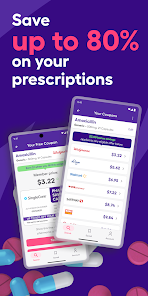
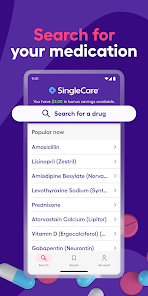
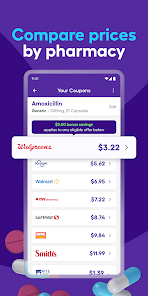
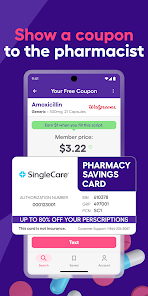
If you're looking for a way to save on your prescription medications, SingleCare may be a good option for you. SingleCare is a free app that allows you to compare prices for prescription drugs at pharmacies near you and get discounts on your prescriptions.When you first sign up for SingleCare, you'll enter some basic information about yourself and your prescriptions. The app will then show you a list of pharmacies in your area and the prices they charge for your medications. You can also see how much you would save if you used SingleCare's discount.
Features & Highlights
SingleCare is a game-changer for anyone looking to save on prescription medications. With a user-friendly interface and robust features, it offers several benefits that truly stand out. Here are some of the core features that make SingleCare a must-have for savvy shoppers:
Real Experience Using SingleCare
Application Scenarios
As a busy professional, I often juggle multiple responsibilities, and managing healthcare costs can be overwhelming. Just last week, I was running low on my prescription for asthma inhalers. Instead of scrambling to find the best price at the last minute, I opened the SingleCare app on my phone during my lunch break. I searched for my inhaler, and within moments, I found a nearby pharmacy that offered a significant discount. Not only did I save money, but I also saved time, allowing me to get back to my day without the stress of an urgent pharmacy visit.
User Experience
Upon downloading the SingleCare app, I was pleasantly surprised by its clean and intuitive design. The layout is straightforward, making it easy to navigate through features without feeling overwhelmed. The search function is particularly impressive; you simply type in the medication you need, and the app displays a list of pharmacies along with their corresponding prices. I found that the app loaded quickly, even when comparing prices across various locations, which is a big plus when you’re in a hurry. Overall, my experience has been seamless, and I appreciate how the app combines functionality with ease of use.
Pricing
One of the best aspects of SingleCare is that it is completely free to use. There are no hidden fees, membership costs, or fine print that might catch you off guard. This transparency allows users like me to focus solely on saving money on prescriptions without the worry of unexpected charges. It's refreshing to find an app that prioritizes user savings over profit.
Updates & Support
SingleCare frequently updates its app to enhance user experience and improve functionality. I’ve noticed regular updates that introduce new features and refine existing ones, which shows that the developers are committed to keeping the app user-friendly. If I ever encounter any issues or have questions, the customer support team is responsive and helpful, providing assistance through various channels. Knowing that support is just a click away makes me feel more confident using the app regularly.
Security & Privacy Review
In today's digital landscape, security and privacy are paramount, especially for users in the United States. SingleCare prioritizes these concerns by ensuring that the app is available through official app stores, such as the App Store and Google Play, which adds a layer of trust. To use the app, I had to provide some personal information, including my name and email address, but I felt reassured by their clear privacy policy and commitment to safeguarding user data.
There are no intrusive ads or questionable tracking behavior within the app, which is a significant plus. I appreciate that they focus on providing a seamless experience without bombarding users with advertisements. Overall, I feel secure using SingleCare, knowing that my data is being handled responsibly while I save on my prescriptions.

 Save up to 80% on prescription medications with ease. Access thousands of pharmacies nationwide for convenience. No insurance needed; everyone can benefit from savings. User-friendly app simplifies coupon retrieval and usage. Receive instant discounts without complicated paperwork or fees.
 Limited pharmacy partnerships may reduce coupon acceptance. Coupons can be confusing to navigate for first-time users. Savings may not apply to all medications or prescriptions.
  Google Play
  App Store

The amount the app shows is not the amount the store charges. I keep getting emails in Spanish when it is set to English. I will be canceling as soon as I can figure out how. I just received a reply from SingleCare but it only addressed the first sentence, about pricing and then asked me to change my review. When all issues are addressed, I may consider changing it.
I love this app. It's ridiculously user friendly, has a great look and, most importantly, the prices are excellent. In comparison to GoodRX, I recommended using both. Many meds are similarly priced on both apps but, sometimes, there is a huge difference and you end up saving a lot. From my experience, SingleCare is the one one with the a bigger price difference for my particular meds.
I have a coupon in hand and signed up for membership and downloaded the app but when I went to Walgreens they were unable to apply the coupon after trying multiple ways. Pharmacist found a coupon on google search which cost me more than I should have had to pay but I had no choice but accept the alternative. SingleCare failed to meet minimum expectations and I am totally annoyed,
just downloaded and it won't let me sign up. add my email, the "sign up" button remains greyed out. fine. sign up on the desktop site, try to login on the app..."log in" button remains greyed out. the sign up and log in buttons only allow pressing when you're BACKING OUT OF THE PAGE! uninstalled immediately. waste of time if your UI can't even function.
Good app. I used both singlecare and goodrx. On some drugs goodrx price is lower on zome singlecare's is better. Honestly, I don't get why so many people complain about pricing and leave those 1 star reviews. It's a free coupon!! If you like the price use it, if you don't then don't use it. To the very list it doesn't hurt to have the pharmacist check price both with goodrx and singlecare coupons. What's the downside?! You are getting a FREE price discount!
Review Source: Google Play store public user reviews.
Yes, users can submit suggestions or feedback through the app's support feature or by contacting customer service directly to help improve the app.
Yes, the app may collect some personal data to provide its services effectively, but it is committed to maintaining user privacy and complying with relevant regulations.
Yes, SingleCare - Rx Coupons allows users to access certain features offline, such as previously downloaded coupons and medication information.
Since SingleCare - Rx Coupons does not have a subscription model, there is no need for cancellation; users can simply stop using the app at any time.
SingleCare - Rx Coupons does not require a subscription fee; it is entirely free to use for accessing discounts on prescriptions.
Yes, you can log in to your SingleCare account from multiple devices. Just use your Customer Number and password. If you encounter issues, contact Customer Service.
No, your Customer Number remains the same. If you need to update your account information, log in and make the changes in your profile or contact Customer Service for help.
Use the "Forgot Password" option on the login page. Follow the instructions sent to your email to reset your password. If you need help, contact Customer Service.
You can reach Customer Service by calling the support number found on our website or using the chat feature for immediate assistance.
After signing up, check your email for the activation link. Click it to activate your account. If you didn't receive the email, check your spam folder or contact Customer Service.
- Bug Fixes