Category: Medical
Developer: Newyu, Inc
 Verified App


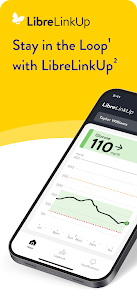
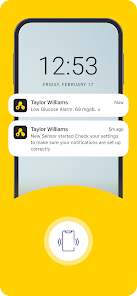
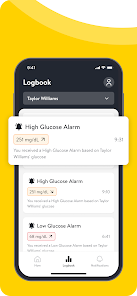
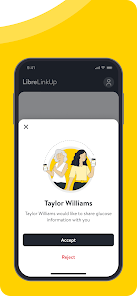

 Stay connected with loved ones Share glucose data in real-time Receive alerts for high/low levels Track trends and insights easily User-friendly interface for all
 Limited compatibility issues Requires constant internet access User interface can be confusing Data sharing may raise privacy concerns Notifications can be overwhelming
  Google Play
  App Store

The only really useful feature just got removed! I loved this app because we could move back and forth in the timeline and leave the pointer there until we notated the number. The line was also a bright, solid color which is great for people with vision problems. Now there is this faint line with little numbers. Nope, your previous engineer got it right.
I've been trying for days on end to connect via the LibreLinkup - I can't accept the invite! The Accept button presents but wont allow me to choose it. I've troubleshooted every way I know how - Please advise. Beyond that - the Libre 3 constantly goes offline or has erratic readings for a app with such important info, I feel like this has great better. I do enjoy the idea of having a monitor all the time but I have to be able to trust it to work.
I was really debating between two or three stars, but the two is deserved. Since the last update after login it has a pop-up asking to start the tutorial on how to understand the readings and no matter what it's just unresponsive, making it basically unusable. And this app has definitely had it's issues in past versions with data just stopping for hours after a monitor is replaced. I've tried all of the troubleshooting methods and it still hasn't worked. Please fix this.
the app just updated and it sucks! I can't monitor anything there is a prompt in the bottom of my screen that says " start tutorial " it appears to be click able but it isn't. now high alarms are going off no low alarms are going off! I would really appreciate going back to how it was when it actually worked. Also yes I un installed and re in stalled the app with nothing but the same issue!
This app used to be extremely useful and helped me keep track of my mom's glucose levels when I was at home or at work. However, it started getting glitchy and dropping the readings for the last couple of months. Since the update, the app has been horrible. I can't move the along the line as easily anymore, it takes forever to load, and I have to login every time I try to use the app. This app needs to be fixed!!
Review Source: Google Play store public user reviews.
Can I submit suggestions or feedback to LibreLinkUp? Yes, users can submit feedback through the app or the official website.
You can contact customer service through the app's help section or visit the official website for support options.
Follow the instructions in the app after registration, including verifying your email and linking your Libre system.
Open the app, enter your email and password, then tap 'Log In' to access your account.
Yes, you need to activate your account after downloading the app to connect with your Libre system.
The customer number can vary by region; please check the app or the official website for the specific number for your area.
A refreshed look and feel to help you find what you need when you need it. Navigate through readings, notifications, and the logbook with ease with bottom bar navigation.