Category: Photography
Developer: PicsArt, Inc.
 Verified App


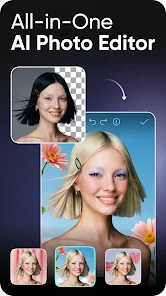
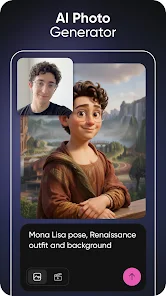
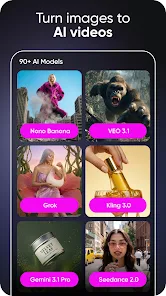
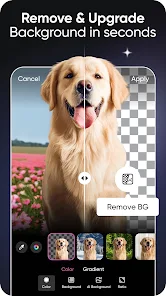
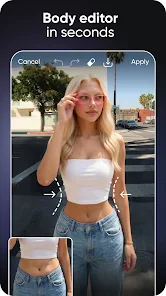
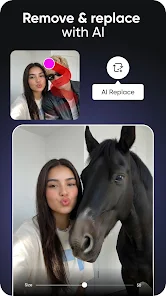
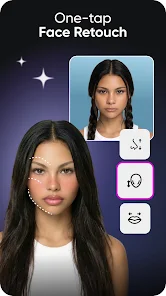
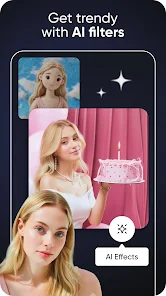
Photos and videos are increasingly becoming a key part of our online presence. Not only do they capture memories and moments, but they can also be used to promote your business or product. But with so many photo editing apps available on the market, which one is the right fit for you? In this blog post, we will explore the features of Picsart Photo & Video Editor App and recommend it as the best choice for anyone looking for an easy-to-use photo editor app.
Features & Highlights
Picsart Photo & Video Editor is a powerhouse of creativity, packed with features that cater to both casual users and professional content creators. Here are some of its standout features that make it a go-to app for photo and video editing:
Real Experience Using Picsart Photo & Video Editor
Application Scenarios
As someone who enjoys both photography and videography, I find myself reaching for Picsart Photo & Video Editor in various scenarios. Whether I'm editing snaps from my recent vacation, creating promotional materials for my freelance work, or simply crafting fun graphics to share on social media, this app has become an integral part of my creative toolkit. For example, after a weekend road trip, I used Picsart to polish my photos, applying filters to enhance the sunset shots and adding whimsical stickers to capture the adventure's spirit. The ability to quickly switch between photo and video editing within the same app is a huge time-saver and makes it perfect for my multitasking lifestyle.
User Experience
The user interface of Picsart is intuitive and visually appealing, making it easy to navigate through its myriad features. Upon opening the app, I am greeted with a clean dashboard that categorizes tools and functions efficiently. The workflow feels seamless, allowing me to move from editing to sharing in just a few taps. Performance-wise, the app is responsive; I rarely experience lag, even when applying complex edits or working with high-resolution images. The overall feeling after using the app is one of satisfaction and accomplishment, as I can see my creative vision come to life without the steep learning curve often associated with graphic design software. The tutorials provided within the app are also a great touch, helping me discover new techniques and features that I might not have explored otherwise.
Pricing
Picsart offers a freemium model, meaning you can access a wide range of tools and features at no cost, which is quite generous. However, for those who want an ad-free experience and additional premium features, there’s a subscription option. I’ve found that the subscription fee is reasonable considering the extensive toolkit and resources available, making it a worthwhile investment for regular users like myself.
Updates & Support
The developers of Picsart are proactive in rolling out updates, often introducing new features and enhancements based on user feedback. I appreciate how the app continually evolves, keeping up with design trends and technological advancements. The customer support is also commendable; I've had to reach out once regarding a minor issue, and the response was prompt and helpful. Overall, it’s reassuring to see a dedicated team behind the app that cares about user experience.
Security & Privacy Review
For American users, security and privacy are paramount when using any app, and Picsart addresses these concerns adequately. The app is available on both the App Store and Google Play, ensuring a level of credibility and safety in its download. During registration, users are required to provide minimal personal data, which is a plus in today's data-sensitive environment. I noticed that the app does utilize ads, but they are not overly intrusive, and users can opt for a premium version to eliminate them altogether. Picsart has a clear privacy policy outlining how user data is used, which gives me peace of mind while creating and sharing my projects. However, as always, I recommend reviewing the privacy settings to manage tracking preferences according to your comfort level.

 Easily enhance photos with powerful AI-driven tools for stunning results. Create engaging videos using intuitive editing features that save time. Access a vast library of templates and effects for creative inspiration. Seamlessly share your creations across social media platforms in one click. Enjoy a user-friendly interface designed for both beginners and pros alike.
 Limited advanced editing features compared to professional software Occasional inaccuracies in AI-generated edits Subscription costs may deter casual users
  Google Play
  App Store

It's a very good app even with just the free version alone, Ive been using it for years and I love how convenient and easy it is! With that being said, Im not happy with the heavy ai integration, it's gotten to a point where I can't even find regular images because everything is clogged with ai and the no ai filters aren't working. Also I might be wrong but I was certain the free mode had much more storage because I run out so fast now
A great app, easiest way to edit things and make images. however, I've been having some bugs lately. The first bug I've had is when I tried to post something and it wouldn't let me make it free to edit. The other bug which happened today was that I was trying to post something and it kept saying there was an error. I restarted my phone after trying countless times to post it, and it's still not letting me post it. Please fix this, thank you.
No longer saves photos when you use the College, since now everything costs money. It used to be free to save, but now you can't do that anymore. Used to upload a lot of stickers on it, but that also costs money to do now. Was good years ago, but I guess I have to find a better "Free" Photoshop app again. Especially for College to add more than 1 photos together. Can't even save an edit either. Smh. It's a pay in order to do anything now, especially for edits.
Ads prevent you from using the app. Got an ad for some of those typical mobile games that you have to play for a bit in order to close it out. But even after the ad opened up Google play to download the game, I go back to the app but I can't get out of the ad. there's no X to close it, ad just stays up. look for a different app for your photo editing needs.
2.5 - The last update (or two) changed the GUI, which while pretty, has made "seeing" what you're getting/choosing more difficult on Create (past the home screen), and in areas of the Editor/Canvas. Also, basic things like being able to choose border colors are now gone. I've been using Picsart for years and this is the first time I've been disappointed and frustrated like this. I've recommended it to numerous people. As it stands now...
Review Source: Google Play store public user reviews.
Yes, users can submit suggestions or feedback through the app's support section, or by contacting customer service via the official Picsart website.
Yes, Picsart AI Photo Editor, Video may collect personal data as outlined in its privacy policy, which typically includes information like usage data and user-generated content.
Picsart AI Photo Editor, Video requires an internet connection for some features, especially those related to AI processing and updates, but it does offer basic editing capabilities offline.
To cancel your Picsart AI Photo Editor, Video subscription, you can go to your account settings within the app or through the app store where the subscription was purchased and follow the cancellation instructions.
The subscription cost for Picsart AI Photo Editor, Video can vary based on the plan chosen, but it generally offers monthly and annual options with a free trial available for new users.
Yes, you can activate your account by entering your customer number during the sign-up process. If you face issues, please contact customer service.
Yes, you can log in using your social media accounts. If you encounter issues, please reach out to customer service for support.
You can reach customer service through the app’s support section or visit our website for contact options.
To update your customer information, log in to your account, go to settings, and edit your profile. For further help, contact customer service.
After signing up, check your email for an activation link. Click the link to activate your account. If you don’t see it, check your spam folder or contact customer service.
Most of what we build doesn't wait for an app update. While this one tidies up a few bugs, the real action happens behind the scenes-new features, fresh content, stickers, and templates dropping all the time. Stay close to our socials so you don't miss a thing.